Streamline Your Editorial Design with the Nature Template
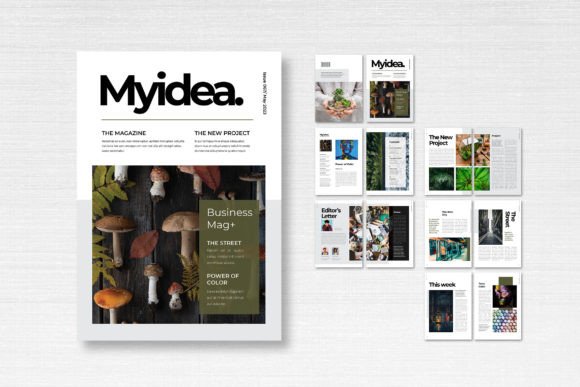
There’s a certain kind of visual calm that comes from a well-executed nature-themed layout. It’s the feeling of open space, clean lines, and imagery that breathes. For designers, marketers, and content creators, capturing that organic, professional aesthetic often starts with the foundation: the template. The Magazine Template – Nature offers exactly this kind of starting point—a clean, professional canvas designed for Adobe InDesign that translates the tranquility of the natural world into a structured, versatile layout for a wide range of print and digital projects.
This isn't just about pretty pictures of landscapes. It's about a design philosophy that prioritizes clarity, hierarchy, and visual breathing room. The template’s strength lies in its neutrality and professionalism. It provides a sophisticated grid system and a curated set of 14 custom pages, including front and back covers, all set to the standard A4 size (21cm x 29.7cm). The CMYK color format and 300 DPI resolution make it immediately ready for high-quality print production, with a 3 mm bleed ensuring your final prints look flawless. For the digital creator, this same structure translates beautifully into online lookbooks, PDF guides, or interactive digital magazines.
A Foundation for Diverse Creative Projects
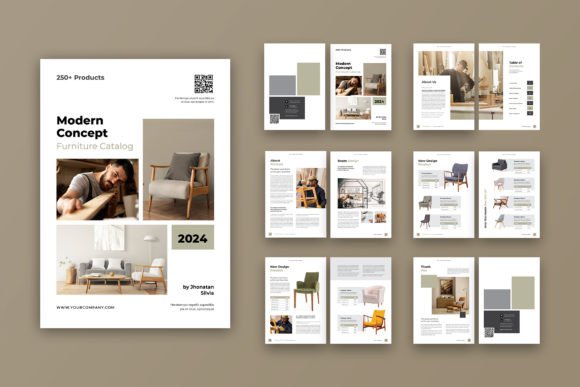
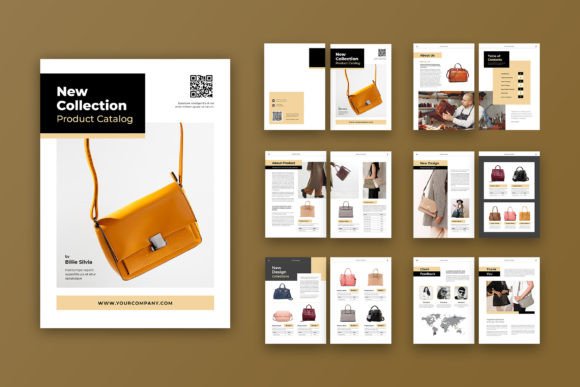
The true value of a professional template like this is its chameleon-like ability to adapt to different goals. Think beyond the obvious magazine. A small business owner could use the layout to create a stunning product catalog for their artisanal goods. The clean margins and smart layers are perfect for showcasing high-resolution photos of ceramics, textiles, or gourmet foods, allowing the products to take center stage without visual clutter.
For a blogger or content creator, this template solves the problem of consistency. Imagine producing a quarterly PDF newsletter for your subscribers. Using the Magazine Template – Nature ensures every issue has a cohesive brand identity, from the cover treatment to the layout of feature articles and photo essays. It elevates a simple document into a perceived premium asset, building audience trust and recognition. The included free fonts from DaFont or Google Fonts are a practical bonus, removing one more hurdle from the design process and ensuring the typography is both stylish and accessible.
Practical Applications Across Industries
The applications extend far into marketing and brand communication. Here’s how different professionals can leverage this resource:
- Editorial and Publishing: The core use case. Design a full-length magazine, a journal, a lookbook, or a brochure. The 14-page structure provides enough variety for features, interviews, photo spreads, and informational content.
- Marketing and Sales Collateral: Create a polished company brochure, a multi-page sales sheet, or a high-end proposal document. The professional presentation can significantly impact how potential clients perceive your brand's quality.
- Digital Products and Lead Magnets: Package your expertise into a beautifully designed eBook, a workshop workbook, or a comprehensive guide. The template's structure helps organize complex information into digestible, engaging sections.
- Event and Brand Storytelling: Design a program for a retreat, a festival guide, or a brand story booklet. The nature-inspired aesthetic is ideal for wellness, outdoor, lifestyle, and eco-conscious brands aiming to connect with their audience on a deeper level.
- Packaging Inserts and Lookbooks: For e-commerce brands, a printed lookbook or a detailed product guide included with shipments can enhance the unboxing experience and educate customers, fostering loyalty.
Enhancing Brand Identity Through Layout
Using a consistent template is a powerful, often overlooked, strategy for strengthening brand identity. When you use the Magazine Template – Nature for your various print materials, you're not just creating one-off pieces; you're building a visual system. The consistent grid, margin settings, and typographic hierarchy create a recognizable rhythm across all your publications. This repetition builds brand recognition. Your audience starts to associate that clean, organized layout with your business, which subconsciously communicates reliability, attention to detail, and professionalism.
The template’s design also inherently improves readability. Its organized layers and clear structure force a logical flow of information, guiding the reader's eye from headline to body text to imagery. This is crucial for keeping your audience engaged, especially with longer-form content like articles or product descriptions. You’re not just presenting information; you’re crafting an experience that respects the reader's time and attention.
Getting Started and Customization Tips
Once you download the template, the real creative work begins in Adobe InDesign. The "neatly organized layers" feature is your best friend here. It allows you to easily isolate and edit specific elements—swap out background colors, adjust text boxes, or replace placeholder images with your own photography without disrupting the entire layout.
A few practical tips for customization:
- Start with Your Brand Colors: While the template comes with a nature-inspired palette, immediately swap in your own brand's color scheme. This single step will begin transforming the generic template into a unique asset for your business.
- Font Pairing is Key: The provided fonts are a great starting point. However, consider pairing the main serif or sans-serif body font with a complementary display font for your headlines to add more personality. Test pairings that reflect your brand's voice—whether it's modern, classic, playful, or authoritative.
- Master Pages are Your Friend: Use InDesign's Master Pages feature to set recurring elements like page numbers, headers, and footers. This ensures consistency throughout the document and saves immense time when editing.
- Always Check Licensing: While the template itself is editable, always double-check the license for any included fonts or graphic elements (like icons) to ensure they are cleared for your intended commercial use. When in doubt, use fonts you've licensed separately.
The Magazine Template – Nature is more than just a set of pre-designed pages. It’s a professional toolkit that provides the structural integrity and visual polish needed to communicate your message effectively. By starting with a solid, adaptable foundation, you free up your creative energy to focus on what truly matters: your content, your story, and your connection with the audience. Whether you're crafting a brand manifesto, a product catalog, or a community newsletter, this template offers a practical path to a professional result.