Minimal - Resume: A Clean Template to Land Your Next Job
In a stack of hundreds of applications, your resume has about six seconds to make an impression. Recruiters aren't reading every word—they're scanning for clarity, organization, and a sense of professionalism. A cluttered, overly designed document often gets passed over, while a clean, well-structured one invites a closer look. That's the philosophy behind the Minimal - Resume template: strip away the noise and let your qualifications speak for themselves through thoughtful, modern design.
This isn't just another template with pretty fonts and vague placeholders. It's built for real-world use by designers, freelancers, recent graduates, and career changers who need a document that works across industries. The layout prioritizes readability and hierarchy, guiding the eye naturally from your name and contact details to your experience, skills, and education. Every section is intentionally placed so nothing feels crowded or overlooked.
Why a Minimalist Approach Works for Modern Resumes
Minimalism in design isn't about being boring—it's about being intentional. When you remove decorative flourishes and excessive color blocks, what remains is content that's easier to scan and digest. Hiring managers appreciate this because their time is limited. A resume that respects their attention by presenting information cleanly stands a better chance of making it past the initial screening.
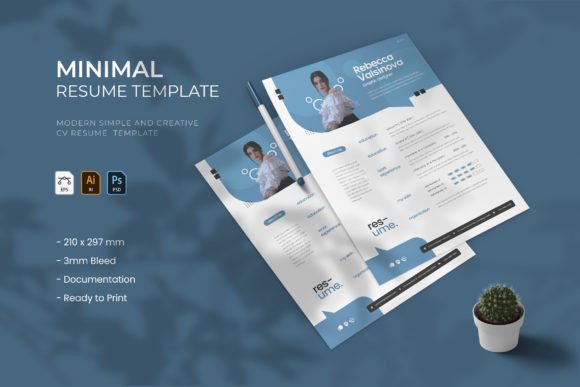
The Minimal - Resume template uses a stylish yet restrained layout with plenty of white space, subtle typographic hierarchy, and a clear visual flow. It includes dedicated areas for your professional summary, work history, technical and soft skills, education, and even social media or portfolio links. There's also room for a professional photo if you choose to include one, with a built-in image placeholder that keeps everything aligned.
What makes this template particularly useful is its flexibility. It ships with three distinct color schemes, so you can match it to your personal brand or the tone of the company you're applying to. Whether you prefer a muted charcoal palette, a soft blue accent, or a warmer earth tone, switching between them takes just a few clicks in your preferred editing software.
Practical Applications Beyond Job Hunting
While the primary use is obvious, this template's clean design philosophy extends well beyond a traditional job search. Freelancers and consultants can adapt it into a professional services brochure. Content creators might repurpose the layout for a media kit. Small business owners could use the structure to create team profile sheets or investor one-pagers.
The underlying design principles—clear hierarchy, balanced spacing, and restrained color use—are the same ones that make brand identity materials, packaging inserts, and editorial layouts effective. If you're building a personal brand, having a consistent visual language across your resume, portfolio, website, and social media graphics matters. This template gives you a strong foundation to start from.
Designers will appreciate that the layered PSD and AI files make customization straightforward. Need to adjust the font pairing? Swap in your brand's typeface. Want to add a section for certifications or volunteer work? The modular layout makes it easy to rearrange elements without breaking the overall flow. The paragraph styles are pre-set, so text formatting stays consistent even as you make changes.
What's Included and How to Get Started
The download package comes with AI, EPS, and PSD files, covering the most common design tools—Adobe Illustrator and Photoshop. The template is sized at 21 × 29.7 cm (A4) or 8.2 × 11.7 inches (US Letter), so it's ready to print or export as a PDF for digital submission. Everything is organized into clearly labeled layers, which means you won't waste time hunting for the right element to edit.
Fonts are a critical part of any design template, and this one uses free, widely available typefaces so you won't run into licensing issues or missing font errors when you open the files. The documentation and Read Me file walk you through installation and customization steps, making it accessible even if you're not a seasoned graphic designer.
One thing worth noting: because the template is built with paragraph and character styles, you can make global changes to font size, weight, or color in seconds. This is especially helpful if you're creating multiple versions—for example, a more formal layout for corporate applications and a slightly more creative version for startups or agencies.
Tips for Making This Template Your Own
Start by filling in your content before worrying about colors or fonts. Write a concise professional summary, list your most relevant experience with quantifiable achievements, and curate your skills section to match the job description you're targeting. Once the text is solid, then adjust the visual elements to support it.
If you're applying to creative roles, consider using one of the bolder color schemes and adding a portfolio link prominently. For corporate or technical positions, stick with the most neutral palette and emphasize clarity over personality. The template's strength is that it adapts to these different contexts without looking generic in either direction.
Before sending your final version, print a test copy or view it on different screens. Check that text is legible at actual size, that contact information is easy to find, and that the overall impression aligns with how you want to be perceived. A clean resume template like this one does the heavy lifting of structure and aesthetics—your job is to make sure the content is honest, specific, and compelling.
Whether you're re-entering the workforce, pivoting careers, or simply refreshing an outdated document, starting with a well-designed template saves time and removes the guesswork. The Minimal - Resume template gives you a professional starting point that you can personalize to reflect who you are and where you're headed.